
What actually happens when you go multilingual in Lovable
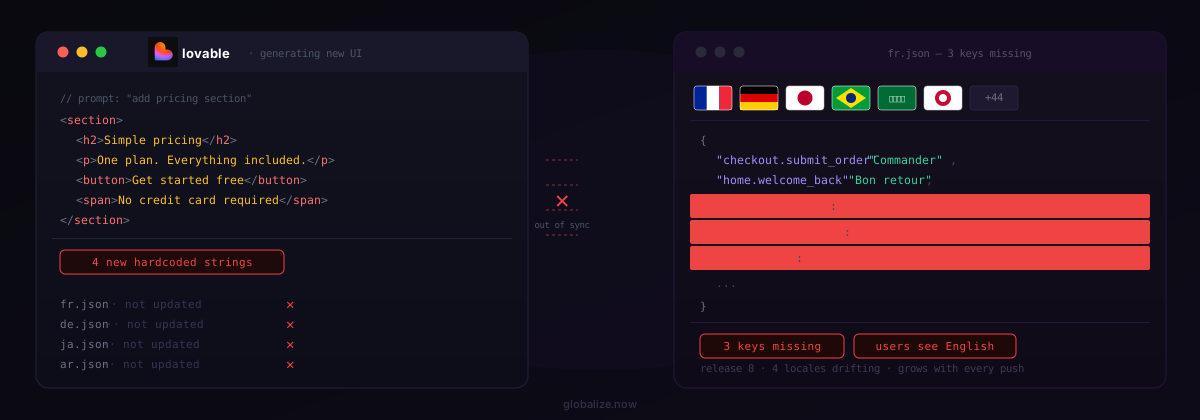
You prompt Lovable to add a new pricing section. Lovable generates the component, wires it in, and ships it. Your English UI is updated. Your messages.po catalogs still point to whatever was there before. French users see the old text. German users see English. Nobody catches it until a real user reports it.
This isn't a Lovable bug. It's a structural mismatch. Lovable optimizes for shipping UI fast. i18n requires tracking every user-facing string across every locale catalog, on every change. Those two goals are in direct tension with each other.
The extraction problem is continuous, not one-time. Every prompt Lovable runs can create new strings. Every iteration changes existing content. There's no natural checkpoint where you can say "extraction is done."
Why the obvious fixes don't hold
Does a one-time extraction run fix it?
No. You can run a string extraction pass after your initial Lovable build and create clean PO catalogs. That works until the next prompt. After that, you're manually comparing diffs across potentially dozens of components and dozens of catalogs. One missed string in your Spanish messages.po catalog and your Spanish users get English text in the middle of a translated page — what's known as a mixed-language UI, one of the most trust-destroying experiences you can ship.
Are runtime translation tools good enough?
Runtime translators like Weglot or JavaScript-injected translation widgets solve a different problem. They translate content after the page loads, which means users see the original language for a fraction of a second before the translated content appears. Beyond the poor user experience, this creates measurable Cumulative Layout Shift — a Core Web Vitals signal that Google uses to rank pages. You're trading an invisible maintenance problem for a visible performance problem.
What about just prompting Lovable to update the locale files?
Lovable can write to PO catalogs if you ask it to. The problem: you have to remember to ask, for every string, on every prompt, across every locale. The cognitive overhead compounds with each language you add. Multiply by four locales and you've turned every UI prompt into a four-step coordination exercise. That's exactly the kind of friction that kills the velocity that made Lovable worth using.
How the Lovable i18n cycle actually breaks down
The pattern is consistent enough that it has a recognizable shape:
- Initial setup — You add multilingual support. It works. Everything is translated. You feel good.
- First few releases— You remember to update PO catalogs manually. It's annoying but manageable.
- Velocity phase— You start shipping faster. PO catalogs start lagging behind. You tell yourself you'll catch up.
- Mixed-language production — Users in non-English markets start seeing partial English. Support tickets arrive. You spend a release cycle doing nothing but hunting strings.
- Refactor tax— Every new feature now has a hidden i18n cost that didn't exist in the English-only version. Your release velocity drops.
The refactor tax is the part nobody talks about when they write "here's how to go multilingual in Lovable" guides. The guides show the initial setup. They don't show what happens on release 12.
The fix: i18n wired into your Git push cycle
The correct architectural answer is to remove manual steps entirely. If translations update automatically on every push, the maintenance problem disappears. You can't forget to run extraction if it runs itself.
The workflow looks like this:
- Connect your Lovable project to GitHub. Use the + menu in the chat input, then GitHub, then Connect project.
- Add the lovable-i18n skill to your workspace. Open Skills in your Lovable workspace, then Add, then Import from GitHub, and paste
https://github.com/globalize-now/globalize-skills/tree/main/skills/lovable-i18n. Confirm. Once per workspace (workspace owner or admin required). - Ask Lovable to set it up. Paste into the Lovable chat:
Set up i18n for my project using the lovable-i18n skill.Lovable detects your stack (Vite SPA or TanStack Start), asks one question (source language, target languages, locale in the URL or not, add the GitHub Action), replygofor defaults. It installs Lingui, scaffolds PO catalogs atsrc/locales/{locale}/messages.po, wraps strings in<Trans>macros, and adds a language switcher. - Review and merge. Lovable syncs to GitHub; review the diff, merge to your default branch.
- Connect the repo to globalize.now. Sign in, connect repository, authorize the GitHub app, select your Lovable repo and default branch, pick languages (50+, RTL included).
- Keep building in Lovable. Every push triggers globalize.now to open a translation PR with updated PO catalogs; merge it, app ships translated.
The key property: the connect-and-sync steps require nothing from you after setup. You don't run a command. You don't check a dashboard. You don't approve a translation queue. New strings in your Lovable-generated components get caught on the push, translated, and PRed back before you've merged the branch. Step-by-step setup lives on the Lovable integration page.
What this means for your Lovable workflow
You don't need to stop using Lovable. The architecture is designed around the assumption that your UI keeps changing — that's the whole point. Lovable generates the UI and runs the lovable-i18n skill; globalize.now handles the sync.
Lovable generates components and applies the skill when you need i18n. globalize.now watches the output on every push. Your users always see a complete, translated UI regardless of how fast you ship.
The vibe coders page at globalize.now has more detail on how the setup works specifically for AI-built apps. If you're already running a Next.js or React app built on Lovable, the developers page covers the technical integration path.
For teams already managing multiple Lovable projects, the per-workspace pricing at globalize.now means you're not paying per language or per string extraction — the sync cost stays flat as your app grows.
The maintenance drag is real and it compounds. Add the lovable-i18n skill in Lovable (Open Skills in your workspace, then Add, then Import from GitHub). See the Lovable integration guide or globalize.now.
globalize.now turns hardcoded app copy into translation-ready locale files and keeps them updated as you ship.
Try globalize.now free